Cleaning audio speech files for tmi-archive
slug: “cleaning-audio-speech-files-for-tmi-archive”
Someone on the TheMindIlluminated reddit asked for help making a number of audio talks related to meditation available. We got into contact and I ended up making tmi-archive.com, a straightforward website where people can listen and search the talks and edit them if they feel like helping out. The interesting part of this small project was denoising and transcribing the audio files, which is what this post is about.
Denoising
The problem with a lot of the talks (and a lot of “older” meditation talks in general) is that the recording quality is rather bad. The recordings are usually done in large rooms with many people listening, resulting in a lot of static and dynamic background noise — people moving around, coughing etc. This makes it a little more unpleasant to listen to than it has to be, so I’ve used the latest and greatest of machine learning research to denoise the audio.
After trying quite some libraries, I’ve ended up using Facebook’s denoiser, which is both simple to use and gave as-good-as-it-gets results.
Notice not only the static hiss that’s almost completely gone, but also the cough at 00:03, which is reduced to some small disturbance. The trade-off is a slight “robotization” of the speaker’s voice, making it sound less human.
Cleaning mp3 files is as simple as using the python denoiser library combined with some slight pre- and post-processing (denoiser can’t load long audio files into memory all at once, needs .wav formats and can only handle 1 channel). This repo contains the code, but the core really is to:
Cut the mp3 into 1 minute .wav files:
sox talk.mp3 cut-files.wav trim 0 60 : newfile : restart
Make it mono-channel at 16kHz:
sox cut-file.wav cut-file-mono.wav --norm rate -L -s 16000 remix 1,2
Denoise the samples:
python -m denoiser.enhance --noisy_dir=./ --out_dir=./denoised --device cuda --dns64
Stitch the 1 minute files back together:
sox --norm *_enhanced.wav $2 rate -L -s 44100
Speech Recognition
Speech recognition (sometimes referred to as STT or ASR) was another processing step I’ve been wanting to do, but have not been able to finish yet. It’s a really “young” field where only the most recent models are getting into a range of usable results. I’ve tried:
- Mozilla’s DeepSpeech, which was easy to install but not good enough to be useful.
- Facebook’s wav2vec and wav2vec 2.0. Based on their paper this should be the best model, but after spending several hours trying to get either of them to work I gave up, and hope someone can figure out a complete tutorial. If you go down this road, I suggest you start with this docker container instead of building everything yourself — it’s a dependency hell.
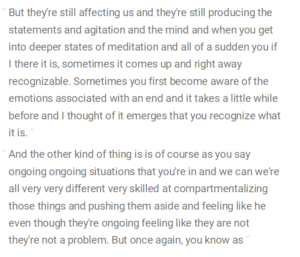
- Silero models, which gives almost good enough results. I might actually end up using this, but it misses punctuation. Moreover, it’s trained on recognizing short utterances (i.e. mo+re+o+ver for the word “moreover”), which results in non-existing words and misses the possibility to recognize non-English words. The output of Silero of the sample given before:
that they're still fecting it and they're still producing the discussions
and hesitationment and the line and when you get into be per stace and
meditation all the i idea if find there it is sometimes it comes up in
this right away recognize able sometimes you first become aware the
emotions associated it takes a little while before and not thought that
emerges that you recognize what it is the other kind of thing is the
first as you say ongoing ongoing situations that you're in and which
we're all very very a de very skill that compartment alizing those
things and pushing them the side and feeling like he even though they're
ongoing feeling like they not they're not a problem but once again you
know as meditation as
- Google Cloud’s speech-to-text, which is the easiest plug-and-play option. But at around $1 per hour of audio, and a lot of audio files, this is going to be quite costly.